

Account settings tabs
The Settings feature is your members’ account area. It does not have a fixed list of tabs — it reads them from your site, so the tabs your members see are the ones your plugins provide.
Core tabs
Section titled “Core tabs”These are always rendered natively:
| Tab | What a member does there |
|---|---|
| General | Their basic account details |
| Account | Username and email |
| Password | Change their password |
| Privacy | Profile privacy settings — see Privacy |
| Email Notification | Which emails they receive |
| In-app Notification | Which push and in-app notifications they receive |
| Notifications (app settings) | A Push notifications switch controlling whether this device receives them |
| Personal Data | Export or erase their data |
| Delete | Delete their account |
Two of these carry labels that differ from the underlying names: notifications appear as Email Notification and In-app Notification, because “web notifications” means nothing on a phone.
Both render the per-type matrix — one section per plugin, one row per notification type — rather than a flat list of switches, and each shows only the channels it owns. Notification preferences covers what a member controls there. If the notifications engine is off, the two tabs fall back to whatever fields your site defines for them.
The app’s own settings screen carries a separate Push notifications switch. It is per device, not per account: switching it off stops this phone receiving, and leaves the member’s tablet alone. It appears only in an app built with Push configured — a switch that could never deliver anything would be worse than none.
Privacy
Section titled “Privacy”The Privacy tab shows the settings Ultimate Member’s own account page shows, and saves them the way that page does:
- Who can see the profile (Profile Privacy).
- Whether search engines may index it.
- Hide my profile from directory.
- Show my last login?
- Any a plugin adds, like um-social-activity’s Who can see your activity wall? or UM Online’s Show my online status?
- Hide my online status, when your app uses Live Presence and UM Online is not installed. It is the same setting UM Online uses.
A setting a member has never changed shows your site’s default, which is the one Ultimate Member applies. Profile Privacy and the search-engine setting appear only for roles with Can make their profile private under Ultimate Member → User Roles, as on your website.
Personal Data and Delete matter for app store review. Both Apple and Google require an account-deletion path inside an app that creates accounts, and this is it.
Extension tabs rendered natively
Section titled “Extension tabs rendered natively”Plugins contribute tabs, and these get real native screens rather than a webview:
| Tab | Plugin | What it shows |
|---|---|---|
| My Photos | User Photos | Albums and photos, with delete. See My Photos |
| My Points | Ultimate Member - myCred | Balances, transfers and referrals. See My Points |
| Payment Methods | WooCommerce + UM WooCommerce | Saved cards. See Payment methods and orders |
| Billing, Shipping | UM WooCommerce | Address forms |
| Orders, Downloads | UM WooCommerce | Order history, an order detail screen, and downloadable files |
| Newsletters | UM Mailchimp | Subscribe toggles, interest groups and tags |
| Social | UM Social Login | Connected providers, connect and disconnect |
| Terms & Conditions | UM Terms & Conditions | The terms, with an agree action |
| Private Messages | UM Private Messages | Opens the Blocked Users list |
| Jobs Dashboard | Ultimate Member - JobBoardWP | The member’s own job dashboard, the same screen as the profile’s Jobs Dashboard tab. See Job Dashboard |
Private Messages hides itself when your app has no Chat tab. The same list is also the Blocked members row, which User Blocking adds to Settings in any app with member content.
Everything else
Section titled “Everything else”A tab from any other plugin, if it carries a URL, opens as a webview card inside the settings screen. The member stays in the app, and the page comes from your website.
The Ultimate Member Stripe billing tab is the usual example.
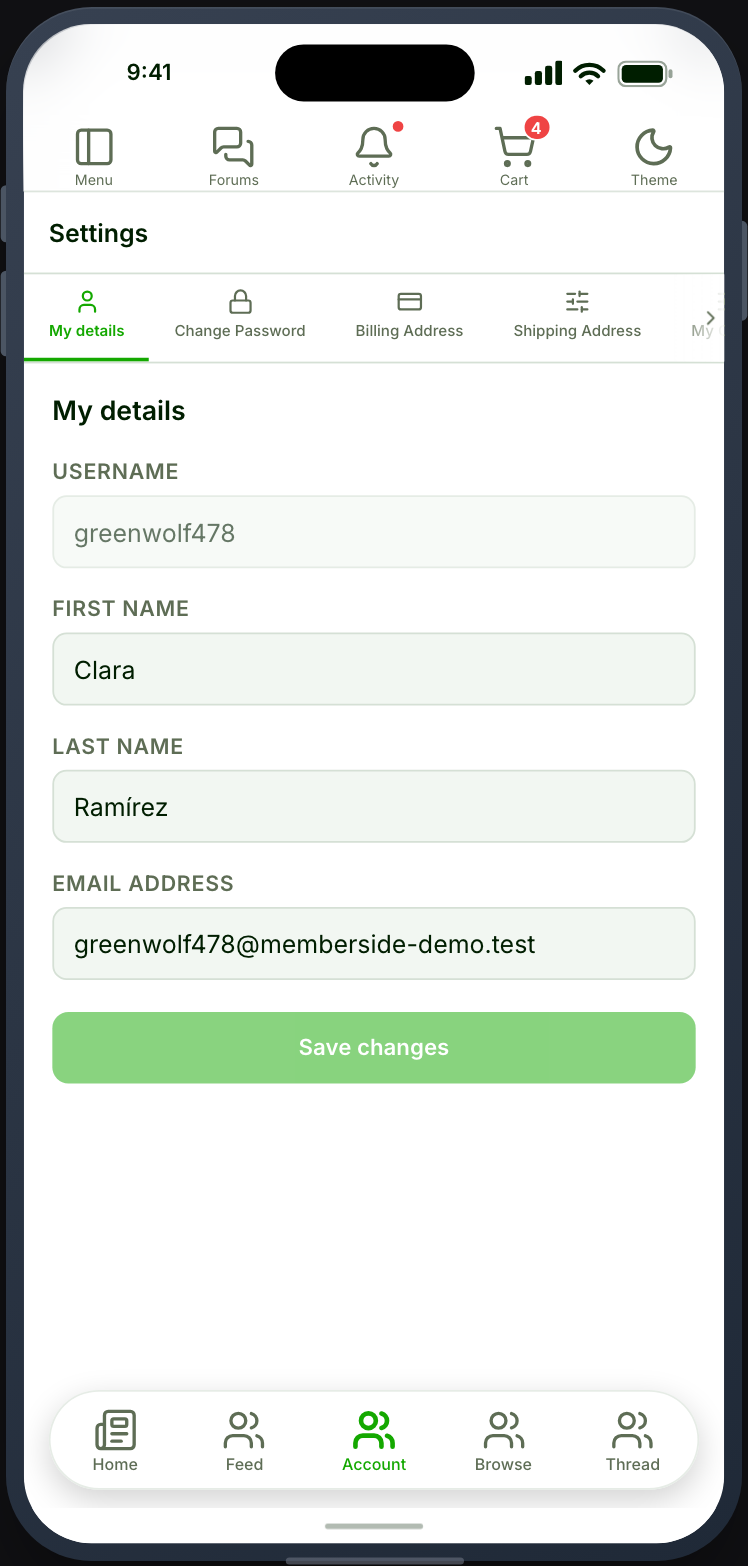
Controlling the presentation
Section titled “Controlling the presentation”Two settings on the Settings feature:
- Show each account tab’s icon — icons beside tab names, or text only.
- Render account tabs as a dropdown — a dropdown instead of a tab strip. Worth turning on when your site contributes many tabs, because a strip of twelve is unusable on a phone.
When it does not work
Section titled “When it does not work”| Symptom | Cause | Fix |
|---|---|---|
| No tabs at all | The Appearance endpoint group is off | Enable it under Memberside → REST API |
| A tab is missing | Its plugin is inactive, or the tab is hidden on your site | Check the plugin, then the account tab settings in Ultimate Member |
| A tab opens as a webview when you expected native | Only the listed plugins have native tabs | Expected |
| My Photos is empty | The Photos endpoint group is off | Enable it |
| Payment Methods is missing | It needs both WooCommerce and UM WooCommerce | Activate both |
| The tab strip runs off the screen | Too many tabs for a phone | Turn on Render account tabs as a dropdown |