

Chat (BuddyPress)
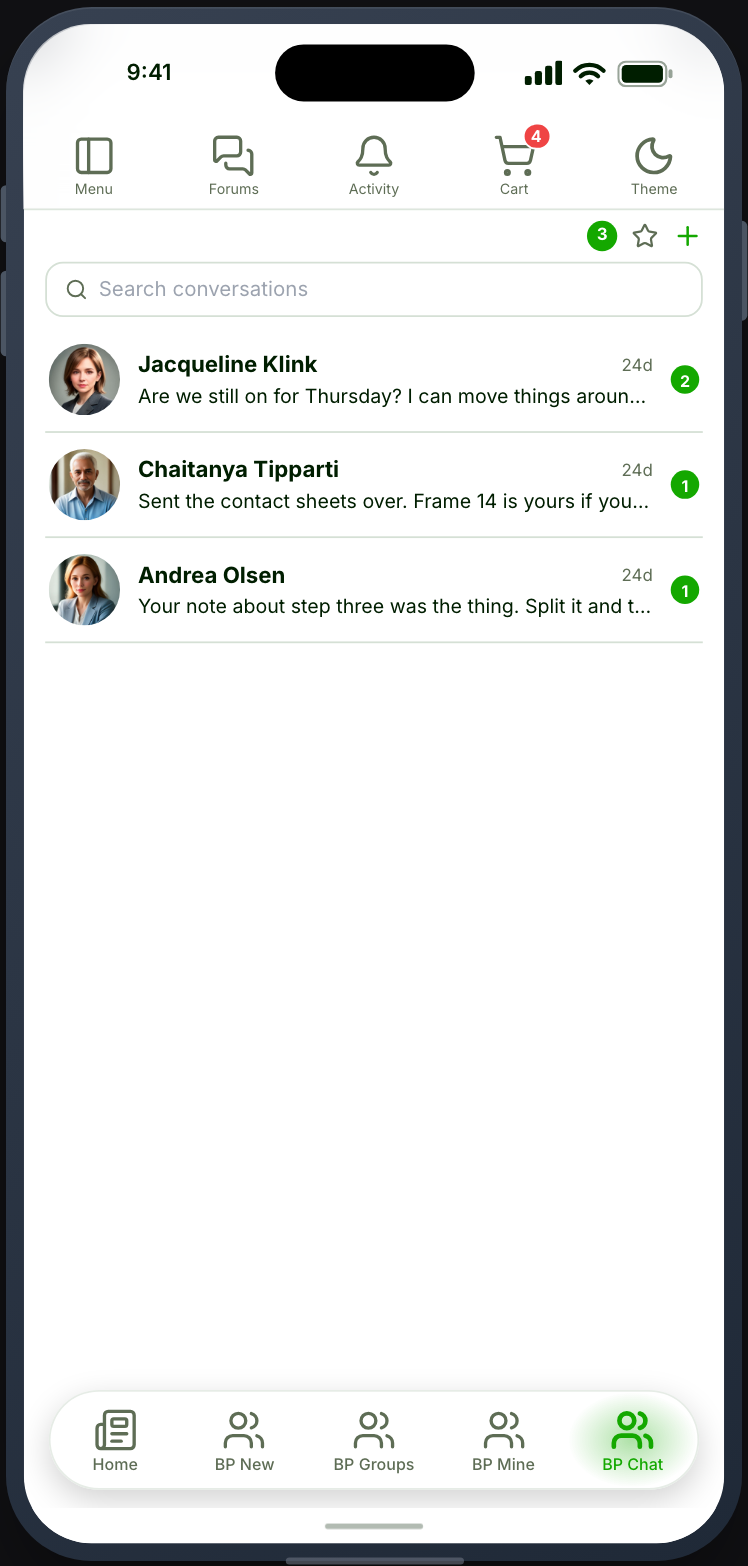
Private conversations between your members, as a native chat screen.
Before you start
Section titled “Before you start”| Plugin | BuddyPress, with the Private Messages component enabled — or BuddyBoss Platform, where it is called Private Messaging |
| Endpoint groups | BuddyPress Messages and BuddyPress Members |
| Plan | Every plan |
BuddyPress ships Private Messages switched off. Turn it on under Settings → BuddyPress → Components, or the card stays greyed out.
The BuddyPress Members group is needed too: starting a conversation begins by searching for people, and that search is the member directory’s.
What members can do
Section titled “What members can do”See their conversations, open one and reply, and start a new one — the + on
the list searches for people and drops them straight into the conversation once
the first message sends. Several people can be picked at once, because a
BuddyPress thread takes as many recipients as you give it.
Inside a conversation they can star it to find it again, mark it unread to keep it in view, and leave it. Leaving removes only them — everyone else keeps the thread, which is how BuddyPress itself behaves.
Emoji are in the composer, the same set the other chat screens use.
A message appears in the thread the moment the member sends it. If it cannot be delivered (the site refuses it, or the phone has no connection), it stays where it is, marked Failed to send in red with the site’s reason, and Resend and Delete underneath. Nothing the member typed is lost.
Videos
Section titled “Videos”With Video connected and BuddyPress private messages switched on in the Video panel, Video sits in the conversation’s composer in the app. Members record a clip or choose one, then drag through the whole video to pick its thumbnail. Words are optional; a message can be just the video. A message takes one video.
A video message follows Hold until ready or Post instantly, like a post. With Post instantly the message is sent straight away and plays the file from your site until the stream is ready; the link to it is signed and lasts an hour, so it works only inside the conversation. With Hold until ready, sending says Your video is processing. It will be sent when it’s ready. The message is not sent yet: its sender sees it at the end of the conversation as Processing your video… with Cancel, and the others see nothing. When the video is ready the message is sent, and the others get it then, with the usual notification. The sender is notified too; the notification opens the conversation.
In the thread a video shows the thumbnail its sender chose. Tapping it plays it, and starting one video pauses any other. A video sent with no words shows as the video alone, and the conversation list, notifications and emails read Video, with a clapperboard.
Links to chat videos expire after an hour, so a video cannot be shared outside the conversation. The app fetches a fresh link when an old one stops working; members do nothing.
A sent message cannot have a video added or replaced. To send a different video, members send a new message.
On your site, videos sent from the app play in BuddyPress’s own conversation pages. BuddyPress’s composer there has no Video button, so members send videos from the app.
Live delivery
Section titled “Live delivery”With Realtime switched on for the site, new messages arrive without the member pulling to refresh, and a typing indicator shows when the other person is writing. Without Realtime the conversation still works: an open conversation checks for new messages every eight seconds, the list every fifteen, and the typing line never shows.
Push notifies members of new messages when the app is closed. Tapping one opens that conversation rather than the list. Several messages from the same person collapse into one notification.
Sent, Delivered and Seen
Section titled “Sent, Delivered and Seen”With Realtime connected, a member’s own messages carry a status beside the time:
| Mark | Means |
|---|---|
| One tick | Sent — the site has the message |
| Two ticks | Delivered — every other member’s app has fetched it |
| Two ticks in your accent colour | Seen — every other member has opened the conversation since it arrived |
In a group conversation, the member’s latest message also says Seen by 3, or Seen by everyone once all of them have read it. Conversations with more than 50 other members show no status.
The ticks change within a second of the other person opening the conversation, whether they read it in the app or on your website. Without Realtime there are no ticks at all, rather than ticks that lag a refresh behind.
A notification that lands on a phone does not count as delivered on its own: it turns to two ticks when the member’s app next opens, or fetches its inbox.
Settings
Section titled “Settings”Search box — let members search their conversations.
Starring — offer the star, and the starred filter on the list. It has an effect only where BuddyPress’s own Star feature is switched on; where it is not, the screen hides both rather than offering a control that does nothing.
Typing indicator — show when the other person is writing. Needs Realtime.
Open member profiles in — which Profile feature a tap on a member’s photo or name opens. Every placed Profile is offered, plus Member Profile (BuddyPress), and Don’t link draws the name as plain text. Left alone it follows the first Profile you placed; see Tab settings.
What it does not have
Section titled “What it does not have”No message reactions or moderation. BuddyPress has no data model for either, so the screen does not draw a control that could not work. Read receipts are the exception: Memberside keeps them itself, with Realtime (above). If you need those, Chat (Ultimate Member) has reactions, and Chat (Better Messages) adds group management and moderation on top.
Blocking does work here. It comes from User Blocking rather than from BuddyPress: a blocked member’s one-to-one conversation stops, and in a group conversation their messages show collapsed.
Three chat features, one app
Section titled “Three chat features, one app”BuddyPress chat, Chat (Ultimate Member) and Chat (Better Messages) are three separate systems with separate data, and all three can be placed in the same app. Each has its own realtime channel and its own push, so they do not interfere.
Think before you do, though: a member with two chat tabs has two unrelated inboxes and no way to tell which one a message will arrive in. Place more than one only when the site genuinely runs the plugins for different audiences.
When it does not work
Section titled “When it does not work”| Symptom | Cause | Fix |
|---|---|---|
| The card is greyed out | BuddyPress’s Private Messages component is off | Turn it on under Settings → BuddyPress → Components |
| No Video button in the app | Video is not connected, BuddyPress private messages is off in the Video panel, or the app was built before video reached chat | Connect it and switch it on in Memberside → Services → Video; rebuild the app |
| A message stays on Processing your video… | The video is long, or could not be converted | Wait a few minutes; a video that cannot be converted says so, and the sender is told |
| No Video button on your website | BuddyPress’s own composer takes no video | Send videos from the app; they play on the website |
| No way to add a video to a sent message | Videos go in when a message is sent | Send a new message with the video |