

Insights
Insights tells you what your community looks at. You get a dashboard in WordPress with views, reactions, forum activity and chat reply times, broken down by day and by the profile fields you choose. Each member gets the counts for their own posts, profile, jobs and the groups they manage — never the names of who viewed them.
Pro and Unlimited include Insights. Starter, Growth and Scale are sold monthly for more events and longer history, and any account can buy one, Free included. See Plans and allowances.
What is counted
Section titled “What is counted”| Metric | What counts as one | Where |
|---|---|---|
| Post views | A member seeing a news feed post | Ultimate Member wall, BuddyPress and BuddyBoss activity — the site feed, profile activity, group feeds and the single post |
| Reactions | A like or reaction on a news feed post | The same feeds |
| Reposts | A member reposting a news feed post, instantly or with their thoughts. Counted for the post that was reposted; taking a repost back does not uncount it | The same feeds |
| Video views | A member starting a video | Anywhere Video plays |
| Profile views | A member opening someone’s profile | Ultimate Member, BuddyPress and BuddyBoss profiles |
| Directory appearances | A member card shown in a member directory | Ultimate Member, BuddyPress and BuddyBoss directories. Also counted as a profile view, and shown separately from profiles that were opened |
| Group views | A member visiting a group page | Ultimate Member groups and BuddyPress / BuddyBoss groups. Posts made inside a group count as post views too |
| Post & page views | A member viewing a WordPress post or page | The post types you choose in Settings |
| Job views | A member viewing a job | JobBoardWP |
| Product views | A member viewing a product | WooCommerce. Only administrators see these |
| Forum topics and Forum replies | A new topic or reply | bbPress and ForumWP |
| Chat response time | How long a member took to answer a message | Ultimate Member Messaging, BuddyPress messages and Better Messages. The site-wide median, and each member’s own |
Each metric has its own switch. A metric whose plugin is not active stays off and says Needs its plugin to be active.
How views are counted
Section titled “How views are counted”Views are counted in your app and on your website, the same way.
- One view per member, per item, per day. A member who opens the same post ten times today counts once.
- Logged-out visitors are never counted. Insights counts members, not traffic.
- Your own views never count. Nobody’s views of their own posts or profile are recorded.
Views go from each member’s device straight to Memberside. On your website, the view is sent after the page has gone to the browser. Your WordPress server does not write a row for each view, so counting adds essentially no load to it. Reactions, reposts, forum posts and chat answers are sent by your site as they happen.
What is stored
Section titled “What is stored”Memberside stores member ids and item ids. Nothing else is recorded unless you choose it:
- Gender, country and age range, and only if you map a profile field to each in Settings. Age is stored as a range — 13–17, 18–24, 25–34, 35–44, 45–54, 55–64 or 65+ — never as a birth date.
- Never the content of a post, a profile or a message.
- Never IP addresses or devices.
How long each kind of record is kept:
| Record | Kept for |
|---|---|
| Individual views | About 5 weeks |
| Daily totals | About 2 years |
| Chat reply times | About 13 months |
The charts read the daily totals. How far back they reach is set by your plan’s history — see History. Figures that need individual views, such as Active members, are only shown for ranges of up to 35 days.
What members can see
Section titled “What members can see”Members see counts for their own things, never who viewed them. When a member reads a breakdown by gender, age range or country, any group with fewer than five viewers is combined into Other, so a member cannot work out who one viewer was. Administrators see exact counts.
What your members see
Section titled “What your members see”With Show members their own Insights on, members find an Insights link on what they own:
| Where | What it shows |
|---|---|
| Under their own feed post — Ultimate Member wall and BuddyPress / BuddyBoss activity | Views, reactions and reposts on that post |
| Their own WordPress post | Views of that post |
| Their own JobBoardWP job, on the job screen and in the Job Dashboard | Views of that job |
| Their own profile, as Your insights | Profile views, how their posts did, and how quickly they reply compared with the site |
| Group insights, in the menu of a group they manage | Views of the group and its posts. Group admins and moderators only |
Switch Show members their own Insights off and the links disappear. Counting carries on, and your dashboard is unchanged.
Your dashboard
Section titled “Your dashboard”Open Memberside → Services → Insights → Dashboard in WordPress.
- Choose a range: Today, Yesterday, This week, Last 7 days, This month, Last 30 days, Last 90 days or Custom.
- Read the tiles: one per metric, plus Active members and Median chat reply.
- Click a tile to chart that metric per day.
- Read the breakdowns under the chart: by Gender, Age range, Country, Where they saw it and App or website.
- Choose what to rank under Most viewed: UM wall posts, Activity posts, Videos, Profiles, UM groups, BuddyPress groups, Posts & pages, Jobs or Products.
Days follow your site’s own timezone. The dashboard catches up within ten minutes, so a view from a moment ago may not show yet.
The gender, age range and country breakdowns stay empty until you map a field to each.
Setting it up
Section titled “Setting it up”1. Connect the service
Section titled “1. Connect the service”- In WordPress, go to Memberside → Services and open Insights.
- On the Connection tab, tick the consent box.
- Choose Authorize this site.
- Approve the domain on memberside.app.
You land back in WordPress connected, and the tab says Recording on your domain. See Authorising a site.
2. Choose what to count
Section titled “2. Choose what to count”On the Settings tab, every metric your plugins support starts on. Switch off the ones you do not want.
3. Map the profile fields you want to break down by
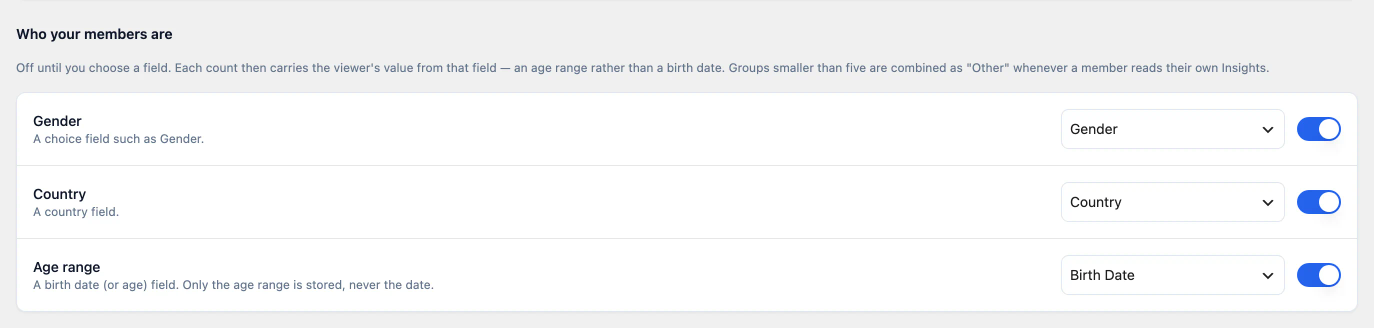
Section titled “3. Map the profile fields you want to break down by”Under Who your members are, choose a field for Gender, Country and Age range. Each list suggests likely fields first and then shows every Ultimate Member field and BuddyPress xProfile field. For age, choose a birth date field or an age field; only the range is recorded.
Each one stays off until you choose a field. Leave a dimension unmapped and nothing about it is recorded.
4. Rebuild your app
Section titled “4. Rebuild your app”Counting views in the app, and the Insights links in it, need a build made after this release. Your website counts as soon as the site is connected.
Settings
Section titled “Settings”| Setting | What it does | Default |
|---|---|---|
| Show members their own Insights | Shows the Insights link on each member’s own posts, jobs, profile and managed groups | On |
| What to count | One switch per metric | On, for every metric whose plugin is active |
| Who your members are — Gender, Country, Age range | Records the viewer’s value from the profile field you choose | Off, with no field chosen |
| Which posts count as Post & page views | The public post types counted as WordPress post and page views | Posts |
Plans and allowances
Section titled “Plans and allowances”Every plan sets three things: how many events are counted each calendar month, how much history your dashboard and your members’ Insights can read, and how many domains share the allowance. An event is one counted view, or one reaction, repost, forum topic, forum reply or chat answer.
| Plan | Price | Events a month | History | Domains |
|---|---|---|---|---|
| Included with Pro | $0 | 1,000,000 | 90 days | 5 |
| Included with Unlimited | $0 | 5,000,000 | 13 months | 25 |
| Starter | $9/month | 3,000,000 | 13 months | 10 |
| Growth | $29/month | 15,000,000 | 25 months | 25 |
| Scale | $79/month | 40,000,000 | 25 months | 100 |
Starter, Growth and Scale are billed monthly only. Any account can buy one, Free included. Every plan has every metric and the breakdowns by gender, age range and country — the included plans too. There is no CSV export on any plan.
The allowance is shared across every site you connect, and staging counts as a domain. Insights in your memberside.app dashboard shows this month’s events against the allowance, the domains connected, and how far back your dashboards reach.
A tier never gives you less than your plan includes
Section titled “A tier never gives you less than your plan includes”A tier that holds no more than your plan already includes shows Included with your plan and cannot be bought. On Unlimited, that is Starter: Unlimited already includes more. If you upgrade your builder plan past a tier you bought, the larger included allowance applies, and you can cancel the tier. It is the same rule as the other add-ons — see Add-ons and build packs.
History
Section titled “History”History is how far back your dashboard, and each member’s Insights, can read. It is a read window, not a deletion date: daily totals are kept for about two years on every plan. Move to a plan with longer history and the older months show straight away. A range that starts before your history begins is read from the oldest day your plan covers.
Changing plan
Section titled “Changing plan”- Open Insights in your memberside.app dashboard.
- Choose Change plan. If Insights is not active on your account yet, the button reads See plans.
- Choose a tier.
- Approve the subscription at PayPal.
The new allowance applies once PayPal confirms the subscription. Moving up charges the difference for the rest of the month; moving down takes effect when the month you paid for ends. See Changing tier.
At the cap
Section titled “At the cap”Every plan is a hard cap, never an overage bill. Past the allowance, new events are not counted until the 1st. Your members notice nothing, your community keeps working, and everything already counted stays in your dashboard. The Connection tab says the allowance is used up. Move to a larger plan and counting starts again within a minute.
Erasing a member’s data
Section titled “Erasing a member’s data”Insights adds a Memberside Insights entry to WordPress’s own Tools → Erase Personal Data. Erasing a member’s personal data there removes their Insights records along with everything else WordPress erases. Deleting a member’s WordPress account removes their Insights records too.
Once the site is connected, Insights also adds a paragraph to the privacy policy guide under Settings → Privacy, describing what is recorded. Copy it into your privacy policy.
Common questions
Section titled “Common questions”Pro and Unlimited include it. Pro includes 1,000,000 events a month with 90 days of history, and Unlimited 5,000,000 with 13 months. Buy Starter, Growth or Scale when you need more events or longer history. There is never a charge for going over.
Free accounts can buy it. Any tier works on Free; you do not need a builder plan first.
Upgrading shows older months straight away. History limits what is read, not what is kept, so a longer plan opens up the daily totals already stored.
It does not slow your site down. Views travel from members’ devices to Memberside, not through your WordPress database.
Members cannot find out who viewed them. They see counts. Small groups in breakdowns are folded into Other for them.
A staging copy does not count. Insights only records on the domain you authorised. A copy of your site on another domain shows Domain mismatch and records nothing.
Website views count logged-in members only. Your page-view numbers will be lower than a traffic analytics tool, which counts every visitor.
When it does not work
Section titled “When it does not work”| Symptom | Cause | Fix |
|---|---|---|
| The approve screen says Subscribe to Insights | Your account has no Insights plan — Free includes none | Open Choose a plan and buy a tier, or move to Pro or Unlimited. Then start the connection again from WordPress |
| Domain mismatch on the Connection tab | The site is running on a different domain from the one you authorised, often a staging copy | Nothing to do on staging. On a moved site, disconnect and authorise the new domain |
| A metric’s switch is greyed out | Its plugin is not active | Activate the plugin |
| Gender, age range or country breakdowns are empty | No field is mapped for them | Choose a field under Who your members are |
| The dashboard does not show the last few minutes | It catches up within ten minutes | Wait, then reload |
| Members have no Insights link in the app | The app was built before this release, or Show members their own Insights is off | Rebuild; check the setting |
| Your own visits to your posts do not appear | Nobody’s views of their own things count | Check from another member’s account |
| Counts stopped part-way through the month | This month’s allowance is used up | Wait for the 1st, or move to a larger plan. Nothing is charged |
| The dashboard will not show older months | Your plan’s history does not reach that far | Move to a plan with longer history; the older months show straight away |
| Starter shows Included with your plan | Unlimited already includes more than Starter | Choose Growth or Scale, or keep what is included |
| Active members shows nothing | The range is longer than 35 days | Choose a shorter range |
| Erase Personal Data says Insights could not reach memberside.app | Your site could not reach Memberside at that moment | Run the erasure again later |