

More Suggestions
Every person, group, job, forum, product, post or event your feed would suggest, in one list that loads more as the member scrolls. It opens when a member taps See all beside a feed suggestion carousel.
This is a background feature. Members reach it from a carousel, never by navigating to it.
Before you start
Section titled “Before you start”| Plugin | The ones behind each kind of suggestion. See Feed suggestions |
| Endpoint groups | Feed Suggestions, plus the groups the buttons call. Saving your layout switches them on |
| Memberside | 2.116.0 or later to scroll past the first few pages |
| Plan | Every plan |
Add it to your app
Section titled “Add it to your app”It is added for you. Switch on Show suggestions in the feed on a News Feed or Activity tab, and More Suggestions appears on the Background tab. It stays there while any feed has suggestions and Show “See all” on each carousel on, and goes when none does.
Open its settings from the Background tab.
Settings
Section titled “Settings”What the list holds, and what each row’s button does, come from the feed’s own suggestion settings. A row behaves exactly as its card would. This screen’s settings are its look:
| Setting | What it does | Default |
|---|---|---|
| Title | A heading above the list | Empty |
| Description | A line under the title | Empty |
| Background | This screen’s background, as on any feature | Your app’s |
Rows take the colours and text sizes you set under Suggestions in the feed’s Appearance: the button fill, text and corner radius, and each kind’s title and details.
What your members see
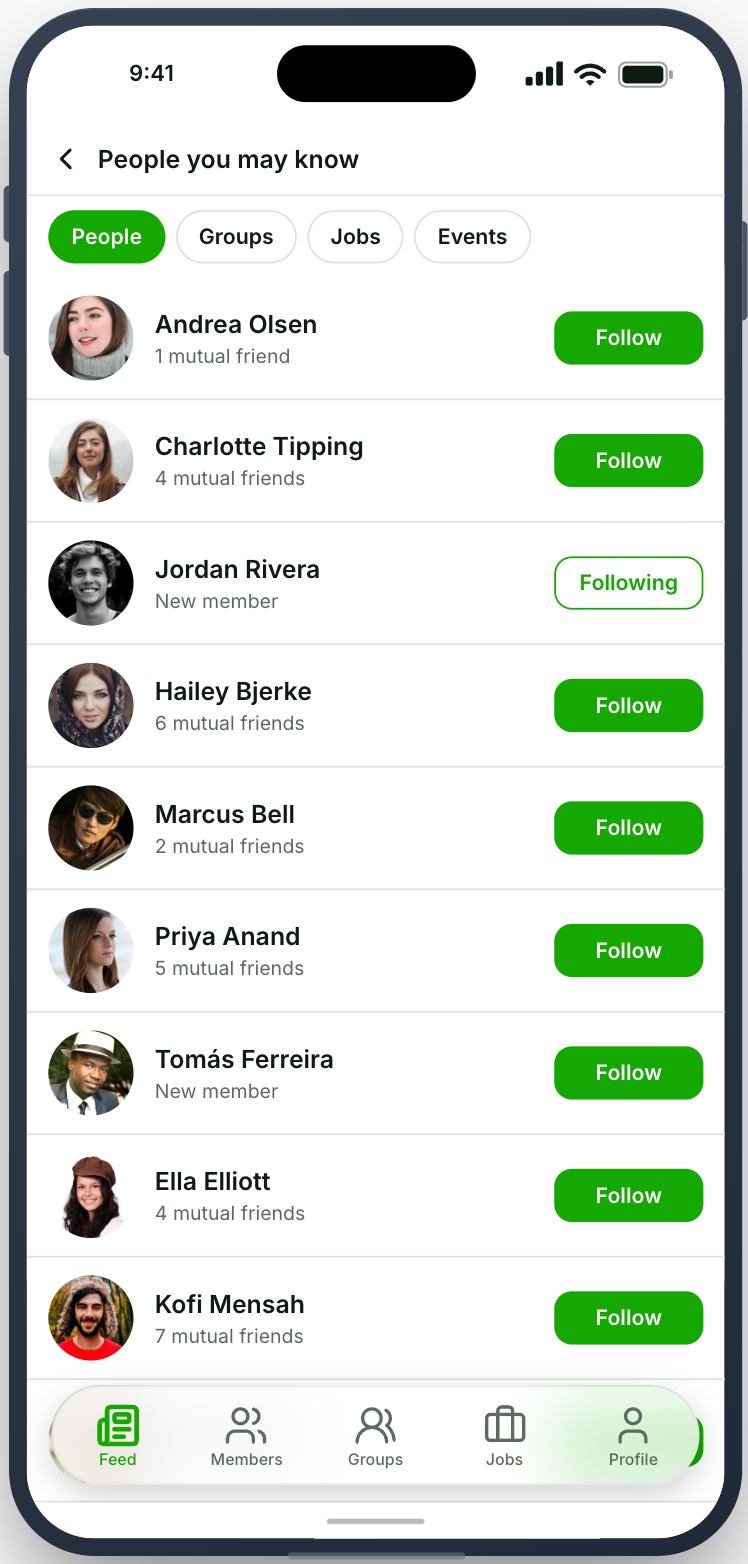
Section titled “What your members see”A back button to the feed, headed by the carousel’s own title (“People you may know”, “Jobs for you”). Under it, one row per suggestion: a photo, the name, the line under it, and the button. People show in your app’s avatar shape.
The list starts with the carousel’s cards and goes on from there. The next 20 load as the member nears the end, until your site has nothing left to suggest. Pulling down starts again from the top.
When the feed suggests more than one kind, chips across the top switch between them. Each chip shows that kind’s list with its own button.
Tapping a row opens it on your app’s own screen, the same screen its card opens. Tapping the button acts straight away: Follow becomes Following, Join becomes Joined or Requested. The row stays, and tapping again undoes a follow, a friend request, a subscription, a save or an RSVP. Back on the feed, the carousel shows the same state.
When it does not work
Section titled “When it does not work”| Symptom | Cause | Fix |
|---|---|---|
| No See all on the carousels | Show “See all” on each carousel is off on that feed, or the app was built before this feature | Turn it on, save your layout, and build again |
| The list stops after a few pages | Memberside is older than 2.116.0 | Update Memberside |
| “Nothing more to suggest right now” | The member already has everything this kind would suggest, or its plugin is inactive | Expected in the first case. Activate the plugin in the second |
| A kind is missing from the chips | It is switched off in the feed’s suggestion settings | Switch it on |