

How builds work
A build turns your configuration into a real Flutter app and compiles it. This page explains what runs, so the log makes sense and a failure tells you something.
What is compiled
Section titled “What is compiled”Your app configuration is not interpreted at runtime. It is used to generate Dart source, which is then compiled like any other Flutter app. The navigation you placed becomes real widgets; your colours become real theme values.
That has two consequences:
- The app is as fast as a hand-written Flutter app, because that is what it is.
- Changing anything in the builder needs a new build before it reaches a phone. The preview updates live; the installed app does not.
The steps
Section titled “The steps”The log narrates each one:
- Preflight. Check the Flutter toolchain is the expected version.
- Create or reuse the workspace. Each app keeps a persistent Flutter project, so later builds are incremental and faster than the first.
- Generate
lib/main.dartfrom your configuration. - Update
pubspec.yamlwith the packages your placed features need. - Copy your app icons and branding assets.
- Set the Android application ID from the app’s own identifier.
- Update
AndroidManifest.xml— internet permission, and cleartext traffic. - Set the display name shown under the icon.
flutter pub get.- Generate launcher icons at every density.
flutter build appbundle --release, then repack that into a universal APK.
The iOS half
Section titled “The iOS half”When your app is set up for iOS, the same press queues a second build that a Mac build server picks up. It repeats the generation steps above, then:
flutter build ipa --release, without signing it yet.- Fetch your signing files from your own site, over a signed request that expires after two minutes.
- Import them into a throwaway keychain that exists only for this build.
- Export a signed IPA with your certificate and provisioning profile.
- Upload to TestFlight, when you have added an App Store Connect key.
- Delete the keychain and your files from the build server.
See How iOS builds work.
Timing
Section titled “Timing”Five to fifteen minutes is normal. The first build for an app is the slowest, because the workspace is created from scratch and every package is downloaded.
An Android job is capped at twenty minutes, an iOS job at forty, and neither retries. A half-finished workspace is not safe to resume, so a failed build is final and you start another. That is also why the allowance counts attempts rather than successes.
An iOS build also waits for a free Mac build server before it starts, and reads “Waiting for an iOS build server” until one picks it up.
You can close the tab. The build runs on Memberside’s servers and continues.
We email you when it finishes, whichever way it went. One press that builds for both platforms sends two emails, because the two halves finish at different times — the iOS one says for iOS in its subject so you can tell them apart. Each names the files that build produced: the APK and AAB for Android, the signed IPA for iOS, and whether the iOS build reached TestFlight.
Reading the log
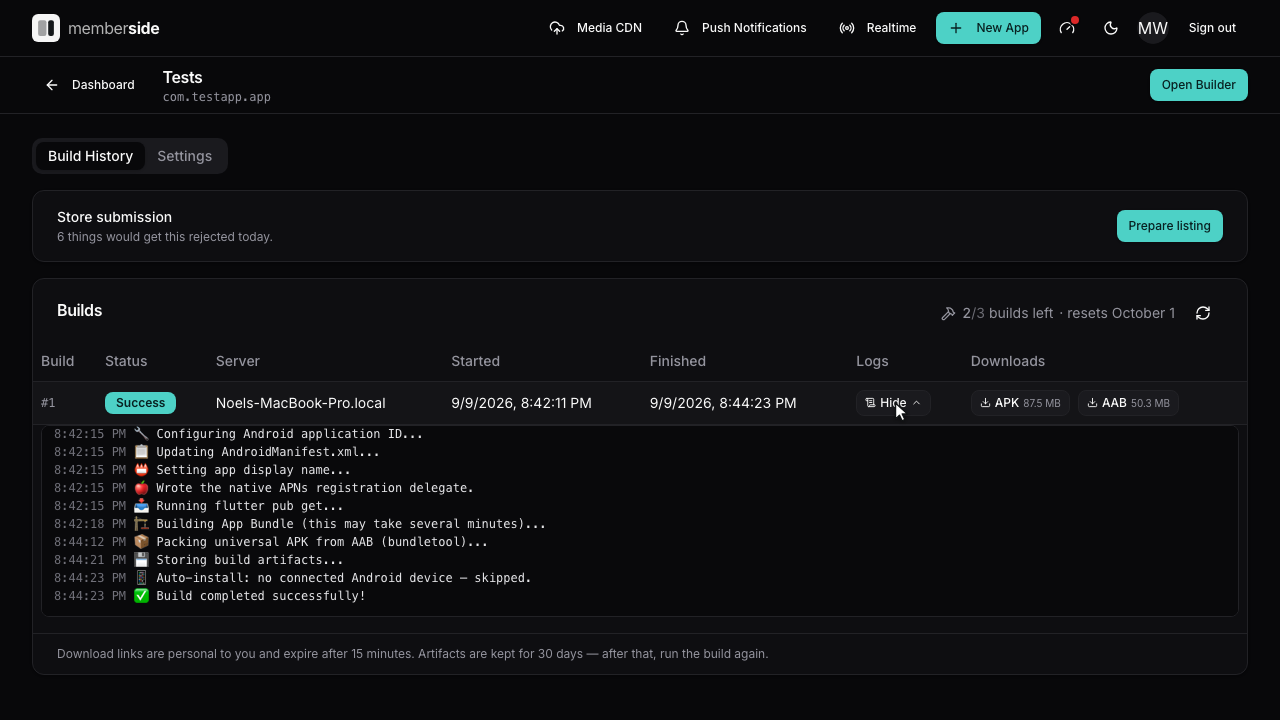
Section titled “Reading the log”Expand a build row to see it. Each step logs a line as it starts, so the last line before a failure names the step that failed.
The lines worth knowing:
| Line | Meaning |
|---|---|
🔧 Configuring Android application ID | Your app’s package name is being written |
📥 Running flutter pub get | Packages are being fetched — slow on a first build |
🔑 Signing certificate SHA-1: … | The certificate the APK was signed with, cached for Google sign-in setup |
🗺️ Native maps: on or off — … | Whether a placed map screen draws a native map, and why not: no Android Maps SDK key from your site, a key that does not look like one, or no map screen placed. When on, the next line names the package and SHA-1 to add to the key |
What a build carries from your site
Section titled “What a build carries from your site”Some of what ends up in the app is read from your WordPress rather than set in the builder, and a build uses whatever it found the last time the builder asked your site what it supports.
That matters most for Push: the Firebase identifiers and your app’s bundle ID are compiled in, so notifications only work in a build made after you added those credentials. Adding a key to a site whose app was built last week does nothing until you build again.
The same is true of Google sign-in’s iOS client ID.
The Turnstile site key is a variation on this: we hold no copy of it, so a build reads it from your site as it runs. It is therefore always current — but it is still compiled in, so adding it to your site needs a rebuild, and a build started while your site is unreachable fails rather than shipping an app whose sign-in screens have no challenge.
What comes out
Section titled “What comes out”An .aab and an .apk. The AAB is built first and the APK is repacked
from it, so they are the same app. See APK and AAB for
which to use when.
When iOS builds too, there is also a signed .ipa, and the build row links
to TestFlight once Apple has taken it.
Each one carries a version worked out from what you changed since your last build — see App version numbers.
Downloading a build
Section titled “Downloading a build”Every file is on the build row, with its size. Pressing one takes you straight to the file — the link is made for you at that moment and stops working after fifteen minutes, so send people the app rather than the link.
Builds are kept for thirty days. After that the row stays, so you can still read its log, but the files are gone and the download says so — run the build again to get them back.
Branding on the splash screen
Section titled “Branding on the splash screen”Free apps show a “Made with Memberside” splash. Removing it is a paid-plan feature, and it is decided from the account’s plan at build time rather than from your saved configuration — so it cannot be turned off in settings and it changes the moment the plan does.
When it does not work
Section titled “When it does not work”| Symptom | Cause | Fix |
|---|---|---|
Stuck at pending, never running | The build queue is not consuming jobs | Get in touch; this is server-side |
| Fails within seconds | Usually an invalid icon or a malformed setting | When a build fails |
| Fails at twenty minutes exactly, or forty on iOS | The build hit its ceiling | Retry; if it recurs, get in touch |
| Succeeds but the app is out of date | You are running an older download | Download from the newest build row |
| Download says the artifact has expired | The build is more than thirty days old | Run the build again |
| A download link you saved no longer works | Links expire after fifteen minutes | Open the build row and press Download again |
Your build allowance explains the metering, and Store readiness checks the app against what each store enforces.