

Media CDN
Media CDN mirrors the media your app requests most — avatars, cover photos and the photos members upload — and serves it from an edge network rather than from your WordPress host.
What it changes
Section titled “What it changes”A member directory is dozens of avatars on one screen. Every one is a request to your origin, and origins are usually the slowest thing in the chain.
Mirrored, those images come from a location near the member instead. The screen that benefits most is the one with the most faces on it: the directory, followers, group members, and search results.
What it mirrors
Section titled “What it mirrors”Local WordPress avatars and uploaded photos, and — on a BuddyPress or BuddyBoss site — member photos and cover images.
BuddyPress keeps its own avatar store, separate from Ultimate Member’s, so a member can have a picture in each and both are mirrored. BuddyPress also stores two sizes of every avatar and serves the smaller one in lists; both are mirrored, because mirroring only one leaves half your screens loading from your own server.
BuddyPress group photos and group covers are mirrored too.
Member uploads
Section titled “Member uploads”Photos members upload are mirrored with every size WordPress makes of them:
- Album photos from Ultimate Member - User Photos
- Images sent in Better Messages chats, and group chat pictures
- Photos attached to BuddyPress activity posts
- Note pictures from Ultimate Member - User Notes, and group pictures from Ultimate Member - Groups
- Event images and job logos added from the app
- Images uploaded to ACF image fields from the app
Only what members upload is mirrored. Your blog images, page banners and the rest of your Media Library stay on your server and are never counted against your storage.
Chat files that Better Messages keeps private are never mirrored. With Better Messages’ attachment proxy switched on, chat files are only reachable through a permission check. The CDN is public, so those files stay on your server. Switching the proxy on later removes the ones already mirrored.
Member videos
Section titled “Member videos”Videos members send in chat or upload to a form field are a separate switch, Member video uploads, and it starts off. A few phone videos can use the whole 1 GB that comes with Pro and Unlimited, so turn it on only once you have storage for it.
A file over the per-file limit (512 MB) is skipped and keeps playing from your server.
BuddyBoss Platform’s avatars and covers are covered, because it is BuddyPress forked — the same avatar and cover store, read the same way. What is not mirrored yet is the photos, videos and documents its own Media components hold; those are a separate store and they still load from your server.
Activity wall photos and profile field uploads
Section titled “Activity wall photos and profile field uploads”Two stores Ultimate Member keeps in each member’s own folder are mirrored too:
- Activity wall photos — photos on Ultimate Member - Social Activity posts, group wall posts and wall comments. Ultimate Member otherwise sends each one through a download script on your server, so a feed full of photos is where this saves the most.
- Profile field uploads — files and images members upload to Ultimate Member profile fields.
A field upload’s link is only shown where Ultimate Member already shows the file, so who can see a file does not change. The difference is that the link no longer expires: anyone a member passes it to can open it. If a field holds documents that should stay behind a sign-in, switch Profile field uploads off.
When a post or comment is deleted, its photo is swapped, or a field file is cleared or replaced, the mirrored copy is deleted too.
Gravatar is left alone. A Gravatar URL already points at a CDN, and putting a second one in front of it adds a hop without removing one.
Each of these can be switched off on its own, under Memberside → Services → Media CDN. Deleting a photo or file removes its mirrored copy whether the service is switched on or off.
Setting it up
Section titled “Setting it up”- Choose a plan at Media CDN in the builder.
- Authorise your site — see Authorising a site.
- Open Memberside → Services → Media CDN in WordPress.
- Click Start mirroring to copy the photos your members already have.
From then on, each new upload is mirrored a moment after it is saved. A replaced photo stops being served from the CDN straight away, so members never see the old one, and the new one follows once it has been copied.
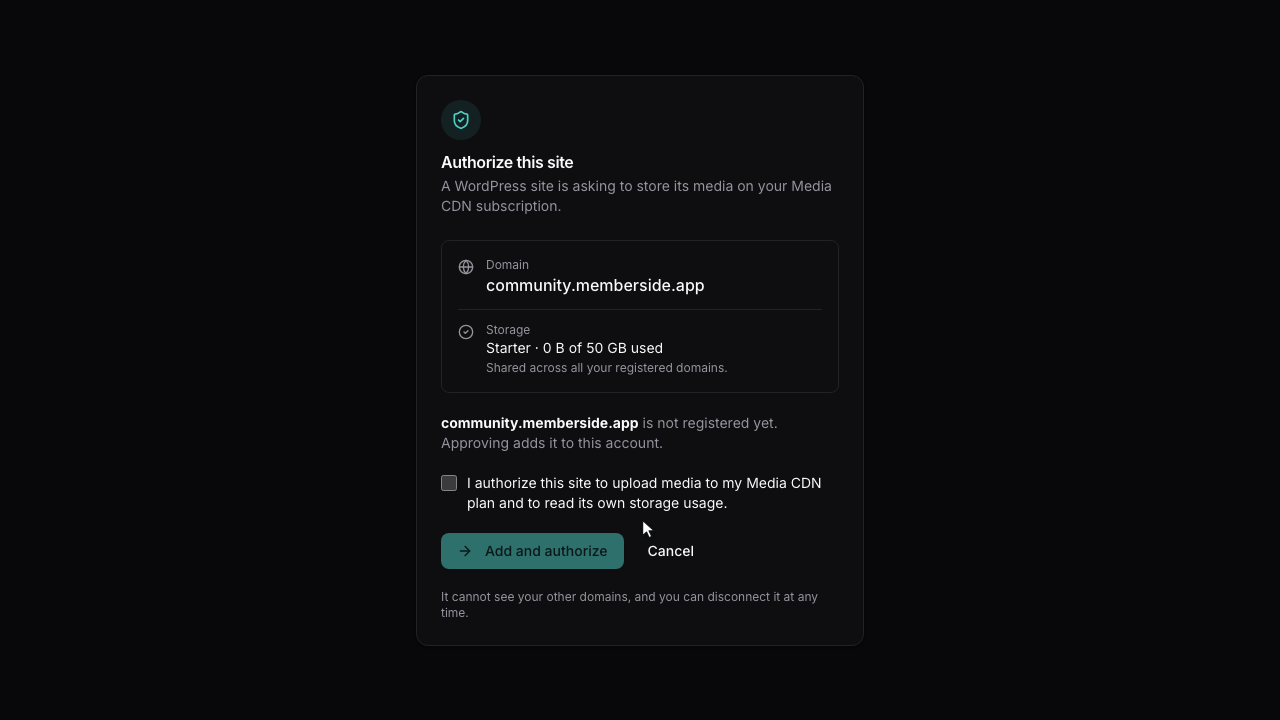
Quotas
Section titled “Quotas”Storage is pooled per user across your account rather than fixed per site, so one busy community and one quiet one share the allowance instead of each holding capacity it does not need.
Your usage is shown on Memberside → Dashboard and on the Media CDN screen. Exceeding the quota stops new images being mirrored; it does not break image loading, because the app falls back to your origin.
That fallback is worth remembering: the failure mode is slow, not broken.
Domains
Section titled “Domains”Media is served from a pre-registered domain. Pointing a domain of your own at the service is part of the setup rather than something you configure afterwards — ask before you plan around a specific hostname.
When it does not work
Section titled “When it does not work”| Symptom | Cause | Fix |
|---|---|---|
| Images look no faster | Nothing has been mirrored yet | Run Start mirroring under Memberside → Services → Media CDN |
| Some avatars are not mirrored | They are Gravatars | Expected — Gravatar is already a CDN |
| BuddyPress photos are not mirrored | Those two kinds are switched off, or nothing has been mirrored yet | Check the kind toggles, then run a backfill |
| BuddyPress group photos are not mirrored | The group kinds are off, or no backfill has run since | Check the kind toggles, then run a backfill |
| Older album or chat photos are not mirrored | They were uploaded before the site was connected | Run Start mirroring; new uploads are mirrored on their own |
| Chat images are not mirrored | Better Messages’ attachment proxy keeps them private | Expected — private files stay on your server |
| Wall photos or field files are not mirrored | They were posted before the site picked up these media types | Click Refresh, then Start mirroring under Memberside → Services → Media CDN |
| A video was not mirrored | Member video uploads is off, or the file is over 512 MB | Switch it on, or expect large files to stay on your server |
| Member uploads cannot be switched on | The site has not picked up the new media types yet | Click Refresh under Memberside → Services → Media CDN |
| Mirroring stopped | The quota is reached | Check usage on the Media CDN screen |
| Images broke entirely | Not caused by the CDN, which falls back to origin | Check the images load on your site directly |
| The site will not authorise | The handshake was not completed | Authorising a site |