

Make forms and directories visible
Turning on the Forms and Directory endpoint groups is not enough. Each individual form and each member directory carries its own switch, and both are off until you set them. This page covers the second switch.
Why there are two switches
Section titled “Why there are two switches”The endpoint group decides whether the API route exists. The per-form switch decides which forms that route is allowed to return.
They are separate because most sites have forms that should never be driven from an app — a legacy registration form, a staff-only profile form, a directory built for one page of the website. Opening the endpoint should not publish all of them.
Make a form visible
Section titled “Make a form visible”- In WordPress, go to Ultimate Member → Forms.
- Open the form you want the app to use.
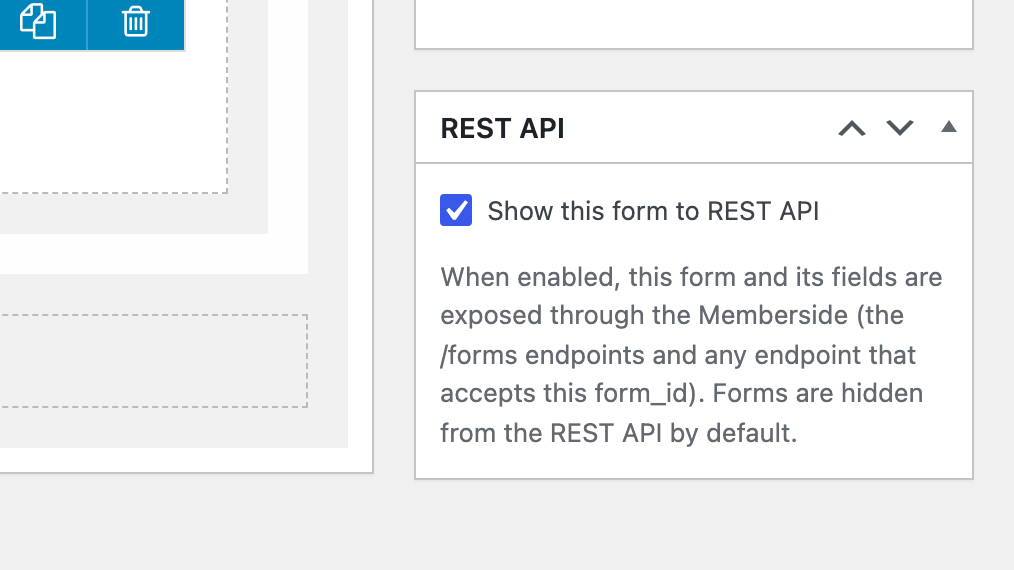
- Tick Show this form to REST API.
- Update the form.
Do this for each form the app needs. In practice that is your profile form and your registration form; add the login form if you use the Ultimate Member Login screen rather than Default Login.
A form that has not opted in can neither be listed nor driven through the API. The app cannot render its fields, and it cannot submit to it.
Make a member directory visible
Section titled “Make a member directory visible”Member directories use the same switch, on the directory rather than the form.
- Go to Ultimate Member → Member Directories.
- Open the directory.
- Tick Show this form to REST API.
- Update.
The Directory feature lists the directories that have opted in, and you pick one in the tab’s settings. A directory that has not opted in does not appear in that picker.
Checking it worked
Section titled “Checking it worked”In the builder, open the tab settings for a form-driven feature and look at the form picker. Every form that has opted in is listed there by name. If the picker is empty, no form has the switch set, or the Forms endpoint group is still off.
When it does not work
Section titled “When it does not work”| Symptom | Cause | Fix |
|---|---|---|
| The form picker in tab settings is empty | No form has Show this form to REST API ticked | Tick it on the forms you need |
| The form picker is empty and no form appears anywhere | The Forms endpoint group is off | Enable endpoints |
| The directory picker is empty | No um_directory has the switch ticked, or the Directory group is off | Tick the switch, then check the group |
| Profile saves silently do nothing | The profile form the app writes to is not the one it reads from | Confirm one profile form is marked visible, not several |
| A form is visible but its fields are missing | The form is a draft | Publish it — only published forms are returned |
Connect your WordPress site to the builder.