

Groups (BuddyPress)
Every BuddyPress group, browsable and joinable, with management for the groups a member runs.
Before you start
Section titled “Before you start”| Plugin | BuddyPress, with the Groups component enabled — or BuddyBoss Platform, where it is called Social Groups |
| Endpoint group | BuddyPress Groups |
| Plan | Every plan |
A BuddyPress component that is switched off behaves exactly like a plugin that is not installed. Check Settings → BuddyPress → Components before anything else.
Add it to your app
Section titled “Add it to your app”- Drag Groups — the card whose subtitle reads BuddyPress — onto a navigation bar.
- Set the sorting, search and column options.
Settings
Section titled “Settings”| Setting | What it does | Default |
|---|---|---|
| Group sort | Ordering | Recently active |
| Group search | A search field on the screen | On |
| Group columns | How many groups per row | 1 |
| Title, Description | Shown at the top | Empty |
| Open member profiles in | Which Profile feature a tap on a member’s photo or name opens, or Don’t link. Lists every placed Profile, plus Member Profile (BuddyPress) | The first Profile placed |
| Restrictions | Which roles see the tab | Everyone |
One column reads as a list, two as a grid. Use two when your group avatars carry the meaning, one when the names do.
What your members see
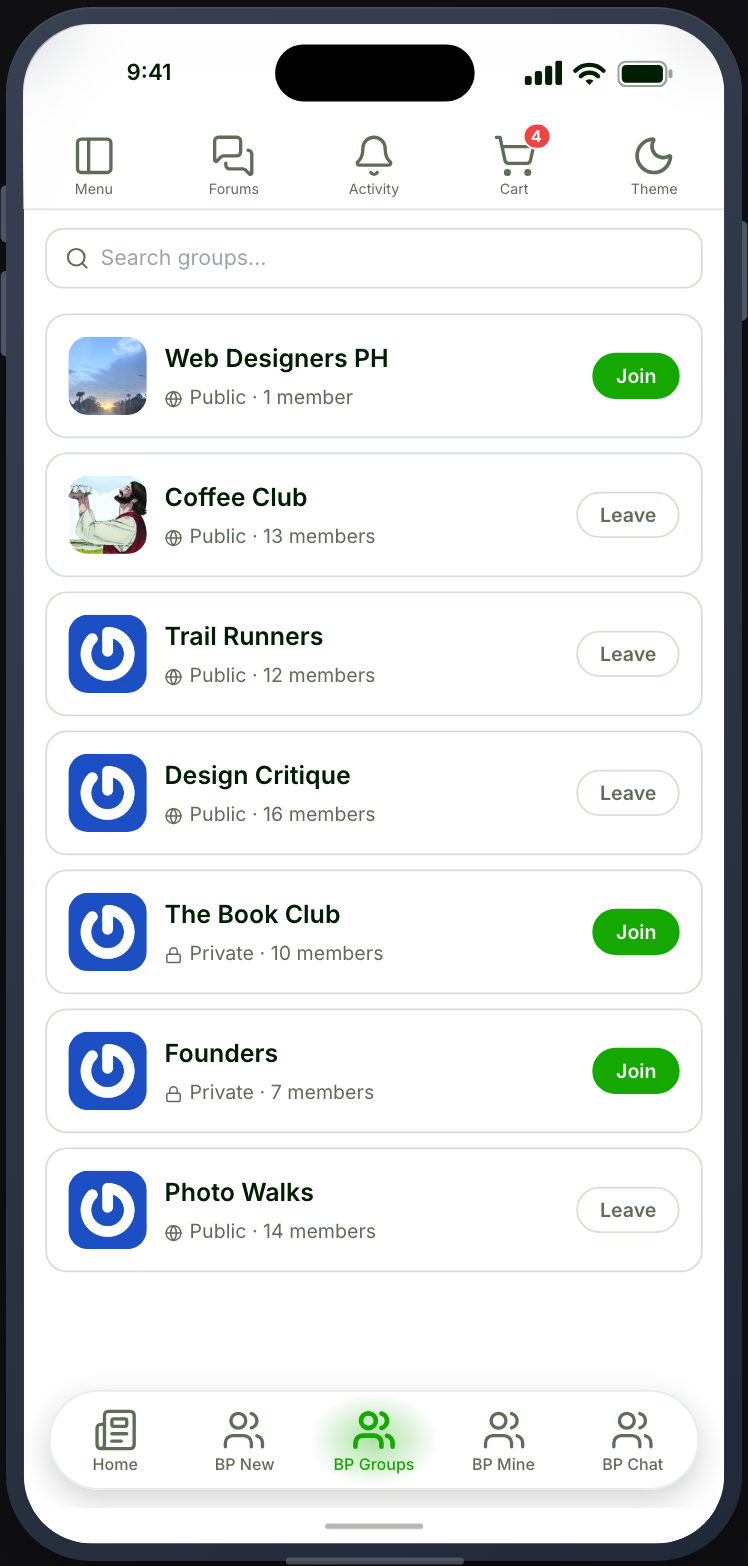
Section titled “What your members see”Groups with avatars, names and member counts. Opening one shows the group, its members and its activity.
Joining works directly for public groups. Private groups take a membership request.
Managing. A member who runs a group can manage its members, approve or reject requests, and send invites, all from inside the app. Invitations already sent stay on a Pending list, so an organiser can see who is still to answer and withdraw an invitation that is no longer wanted.
A group’s activity takes @mentions of its members and #hashtags. See Mentions and hashtags.
Not the same as Ultimate Member groups
Section titled “Not the same as Ultimate Member groups”BuddyPress groups and Ultimate Member groups are separate systems with separate data. Placing both shows your members two unrelated sets of groups.
Use whichever your site actually runs.
When it does not work
Section titled “When it does not work”| Symptom | Cause | Fix |
|---|---|---|
| The card is greyed out | BuddyPress is inactive, or the Groups component is off | Enable the component |
| The list is empty | The BuddyPress Groups group is off | Enable it |
| Private groups are missing | The member cannot see them | Expected |
| Joining does nothing | The group requires approval | Expected |
| No management actions | The member does not run the group | Expected |
| Two unrelated sets of groups | Both group features are placed | Remove one |
| The list fails to load on BuddyBoss | Plugin older than 2.53.0 | Update the Memberside plugin |
| Group photos are square | The Avatars shape is Square, so groups follow it | Expected — an explicit choice is never overridden |
| Tapping a member’s photo does nothing | No Profile feature is placed, or the setting is Don’t link | Place a Profile feature, or pick one in the setting |