Delete Account
Lets a member close their own account, confirmed with their password.
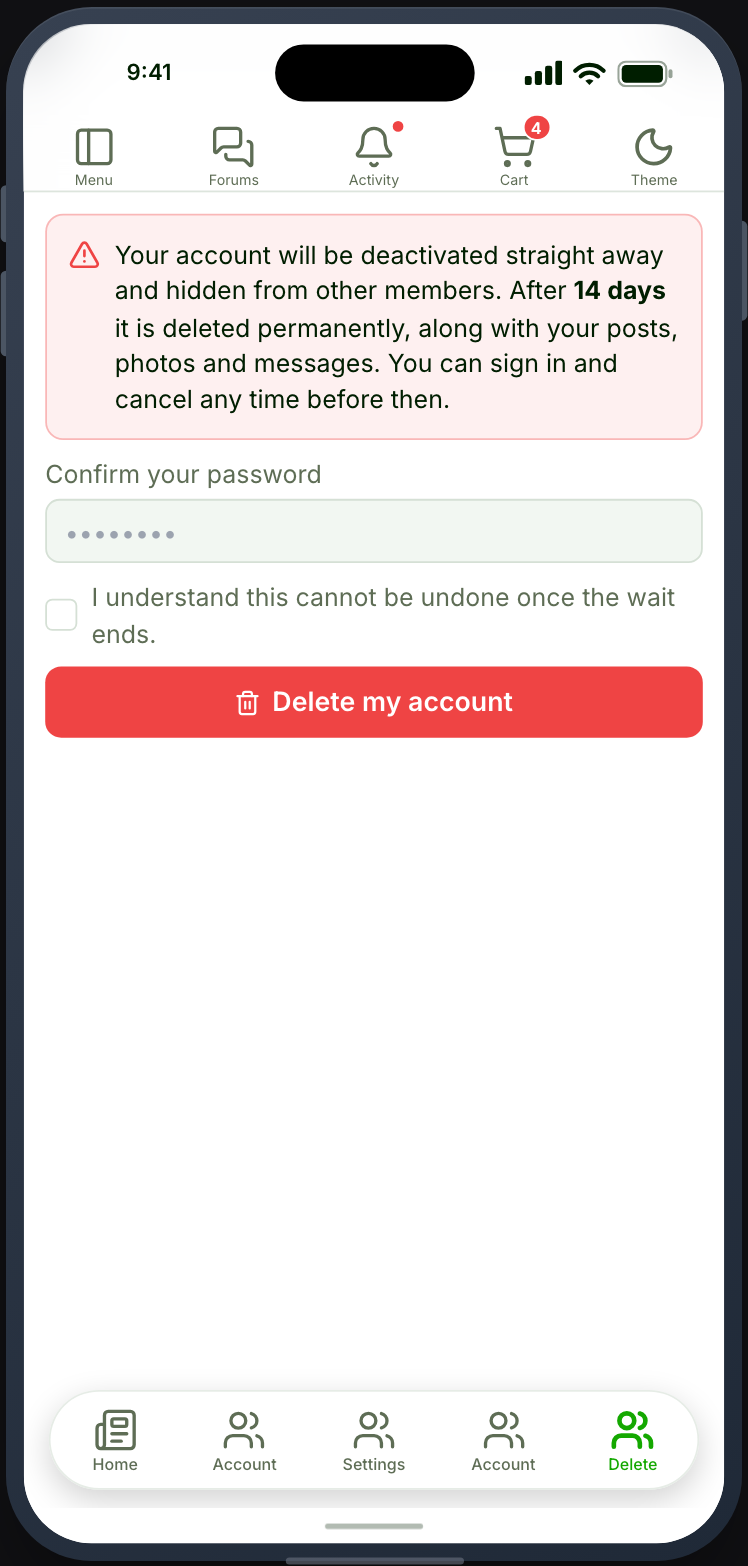
Deleting is not instant, and deliberately so. Confirming deactivates the account: the member disappears from the directory, from search and from other members’ view of their posts, and the account stops being usable. It is permanently deleted a week to a month later, and until that moment the member can sign in and call it off.
Before you start
Section titled “Before you start”| Plugin | None. WordPress core |
| Endpoint group | Account Deletion |
| Plan | Every plan |
Not the Account group. That one is Ultimate Member’s. This screen is
wp_check_password() and wp_delete_user(), and it has its own switch so a site
can run every other account tab without offering self-service deletion.
Add it to your app
Section titled “Add it to your app”- Drag Delete Account onto a navigation bar or the side drawer.
- Choose how long the account waits before it is really deleted.
- Decide whether to ask why they are leaving.
Members-only, like any account screen: place it where a signed-in member will find it, typically the side drawer rather than the bottom bar.
Settings
Section titled “Settings”| Setting | What it does | Default |
|---|---|---|
| Wait before deleting | 1 week, 2 weeks or 1 month | 2 weeks |
| Ask why they are leaving | Adds a required note to the form | Off |
| After cancelling, go to | Where a member lands once they keep the account | Stay here |
| Title / Description | Optional heading above the screen | None |
Wait before deleting
Section titled “Wait before deleting”Your site enforces a 7 to 30 day range whatever the app asks for. The app sends a preference; the site decides. That is why an app cannot offer an instant deletion even by accident, and why changing this setting in the builder changes what new requests get rather than what already-pending ones do.
The wait is what makes the feature safe rather than merely slow. Someone who taps this by mistake, or whose phone is used by somebody else, has a way back.
What happens during the wait
Section titled “What happens during the wait”- The member is hidden from the directory, from member search, and their posts and comments are hidden from everyone else.
- Their own view is unchanged — they can still see their content.
- They can sign in. This is intentional and is what makes cancelling possible.
- They are emailed when the request is made and again if it is cancelled, so a request they did not make is something they can find out about in time.
What happens at the end
Section titled “What happens at the end”The account and its content are deleted together: posts, photos and messages go with it. Nothing is reassigned to another author, and nothing can be recovered.
Deletion runs on Action Scheduler when your site has it — it ships with Ultimate Member and WooCommerce — and on WordPress’s own scheduler when it does not. Either way the account goes; Action Scheduler only makes it punctual.
Settings › Delete
Section titled “Settings › Delete”The Delete tab inside the Settings screen runs this same flow. It used to delete the account on the spot with no way back; it now deactivates and schedules exactly as this screen does, so however a member reaches it they get the same behaviour and the same chance to change their mind.
You do not need to place both. Place this feature when you want deletion to be its own screen; otherwise the Settings tab covers it.
What your members see
Section titled “What your members see”The screen explains what deletion does, asks for the password, and then shows the date the account goes. Until that date the member can cancel and come back.